
Leading Consent Management Platform
Compliant with GDPR, CCPA, COPPA, LGPD, PECR, PDPA, PIPEDA, and more.
UniConsent CMP 的 Google Consent Mode 集成
- UniConsent CMP 的 Google Consent Mode 集成
- 如何设置 Basic Consent Mode 和 Advanced Consent Mode v2
- 如何使用 UniConsent 为 Google Consent Mode 创建 Cookie 横幅
- 如何使用 UniConsent 为 Google tag (gtag.js) 设置 Consent Mode
- 如何使用 UniConsent 为 Google Tag Manager 设置 Consent Mode
- Google Tag Gateway 与同意管理
在开始之前,您需要注册 UniConsent 并获取网站或应用的许可证 ID。
Google Consent Mode 是一个 API,允许您向 Google Ads、Campaign Manager、Display & Video 360、Search Ads 360 和 Google Analytics 发送匿名事件数据。
如果您未实施 Consent Mode v2,将来您将无法对这些受众进行再营销/个性化广告。为保留对这些受众的衡量能力,您应在 2024 年底前为 EEA 用户实施 Consent Mode V2。
UniConsent 与 Google Consent Mode 无缝集成。只要您已通过手动方式或 Google Tag Manager 在网页上安装了 UniConsent CMP 标签,就无需进行任何特殊配置即可启用此集成。如果您不使用 Consent Mode,可以在 CMP 控制台中关闭此功能。
您可以在 https://www.uniconsent.com/docs/tutorials/gtm-integration 找到如何通过 Google Tag Manager 安装 UniConsent 的说明。
使用 Google 推荐的同意消息
如果您仅使用 Consent Mode 而不使用 IAB TCF/IAB GPP API,可以使用 Google 推荐的同意消息。
We use cookies to provide you with the best possible experience. They also allow us to analyze user behavior in order to constantly improve the website for you. <a class="font-bold underline cursor-pointer" href="https://business.safety.google/privacy/">Privacy Policy</a>
Google Consent Mode V2 手动设置
注意:如果不使用 Google Tag Manager,您必须实施以下默认同意状态脚本才能使 Google Consent Mode V2 正常工作。
如果您使用 Google Tag Manager 且未添加默认同意状态脚本,则必须在标签配置级别更新 Consent Mode 设置:根据地区或全局将 Consent Mode Default Consent Settings 设置为 denied。详情请参阅通过 Google Tag Manager 设置 Google Consent Mode V2。
将以下标签放置在 UniConsent CMP 标签之前,以及 Google 标签或任何其他广告标签之前:
<script>
(function() {
    if(!window['gtag']) {
        window['dataLayer'] = window['dataLayer'] || [];
        window['gtag'] = function(){window['dataLayer'].push(arguments);}
    }
    window['gtag']('set', 'developer_id.dZTcxZD', true);
    window['gtag']('consent', 'default', {
        ad_storage: 'denied',
        functionality_storage: 'denied',
        personalization_storage: 'denied',
        analytics_storage: 'denied',
        ad_user_data: 'denied',
        ad_personalization: 'denied',
        security_storage: 'granted',
        wait_for_update: 1000
    });
    window['gtag']("set", "ads_data_redaction", true);
    window['gtag']("set", "url_passthrough", false);
})();
</script>
或使用简短标签:
<script src="https://cmp.uniconsent.com/v2/stubgcm.min.js"></script>
如果您使用单一标签(https://cmp.uniconsent.com/v2/cmp.js)安装了 UniConsent,该标签已经设置了 Consent Mode 默认状态(wait_for_update 为 3 秒)。请勿重复添加默认状态代码。请参阅安装 UniConsent 网页标签。
以上代码会延迟所有 Google 标签的 Cookie,直到用户授予同意为止,security_storage 除外。
您可以根据需求更新 ads_data_redaction 和 url_passthrough 的值。
注意:如果将 url_passthrough 设置为 true,Google 标签会将 _gl 或 _ga ID 附加到您的 URL 并通过 URL 传递数据。如果您不希望 GA4 修改您的 URL 并附加 _gl 参数,可以将其设置为 false。
如果某些选项在您的国家/地区默认不需要,您可以将值更改为 granted。例如:
<script>
  window.dataLayer = window.dataLayer || []
  function gtag() {
    dataLayer.push(arguments)
  }
  gtag('consent', 'default', {
    functionality_storage: 'granted',
    security_storage: 'granted'
  })
</script>
如果您的网站已设置了 Google Tag Manager,请确保将 GTM 脚本放置在默认 Consent Mode 脚本之后。
通过 Google Tag Manager 设置 Google Consent Mode V2
如果您的网站尚未设置 Google Tag Manager,请按照以下步骤操作:
- 注册/创建 Google Tag Manager 账户并创建容器。
- 进入 Google Tag Manager 控制台,从顶部导航面板选择容器 ID。
- 将 GTM 脚本插入自定义脚本和 UniConsent 标签之间。同时记得在
<body>标签开始后添加<noscript>元素。
然后按照 https://www.uniconsent.com/docs/tutorials/gtm-integration 的说明通过 Google Tag Manager 设置 UniConsent CMP。
如果您使用 Google Tag Manager 且未在页面上手动添加默认同意状态脚本,则必须在 UniConsent CMP 标签配置中配置 Consent Mode Default Consent Settings。根据地区或全局将所有同意类型设置为 false(denied)。
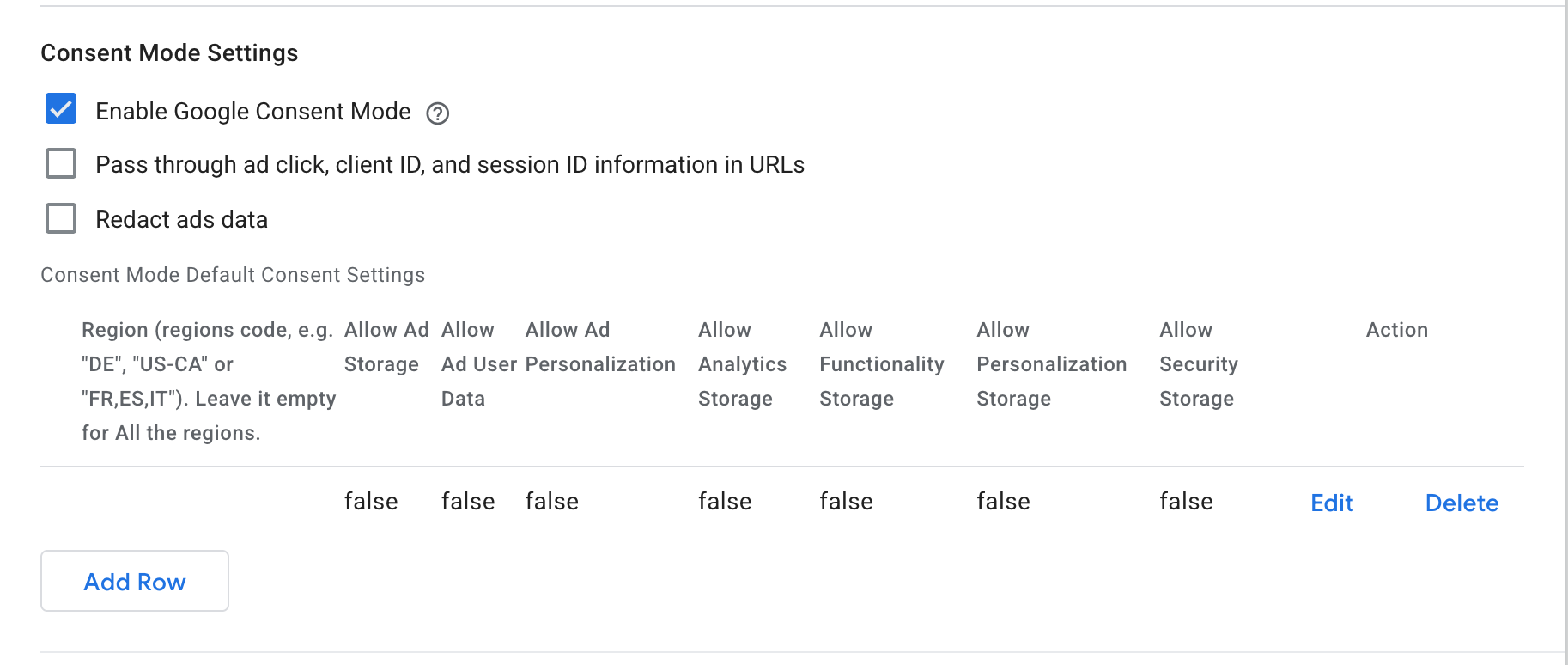 Set Consent Mode Default Consent Settings in UniConsent CMP Tag Configuration
您可以指定地区(例如"DE"、"US-CA"或"FR,ES,IT"),或将地区字段留空以全局应用设置。
Google Consent Mode 同意类型映射
| Google 同意类型 | UniConsent 简单模式同意类型 | 用途 |
|---|---|---|
| ad_storage | Targeting and Advertising | 启用广告 Cookie。 |
| analytics_storage | Performance | 启用分析 Cookie。 |
| functionality_storage | Functionality | 启用用于网站功能和设置的功能性 Cookie。 |
| personalization_storage | Functionality | 启用用于用户个性化的功能性 Cookie。 |
| security_storage | Strictly Necessary | 启用用于网站安全和保护、用户界面偏好等的必要 Cookie。此类 Cookie 不需要同意。 |
| ad_user_data | Targeting and Advertising | 启用广告 Cookie 以设置向 Google 核心平台服务发送个人数据的同意。 |
| ad_personalization | Targeting and Advertising | 启用广告 Cookie 以使用数据进行广告个性化,如再营销。 |
Google Consent Mode 与 IAB TCF 的同意类型映射
| 目的 | 说明 | 目的被拒绝时 Google 标签的行为 |
|---|---|---|
| Store and/or access information on a device | ad_storage = denied | ad_storage = denied ad_user_data = denied |
| Create a personalised ads profile | ad_personalization = denied | ad_personalization = denied |
| Select personalized ads | ad_personalization = denied | ad_personalization = denied |
| Measure ad performance | ad_user_data = denied | 在 Google Analytics 中禁用 Google signals 功能(仅适用于网页标签)。 |
| Apply market research to generate audience insights | 在 Google Analytics 中禁用 Google signals 功能(仅适用于网页标签)。 | |
| Develop and improve products | 在 Google Analytics 中禁用 Google signals 功能(仅适用于网页标签)。 |
如何确认 UniConsent CMP 的 Google Consent Mode 在您的网站上正常工作?
1. 使用 Google Tag Assistant
在左侧找到 Consent 并点击,然后点击右侧的 Consent 标签页。您应该会看到类似以下的内容:
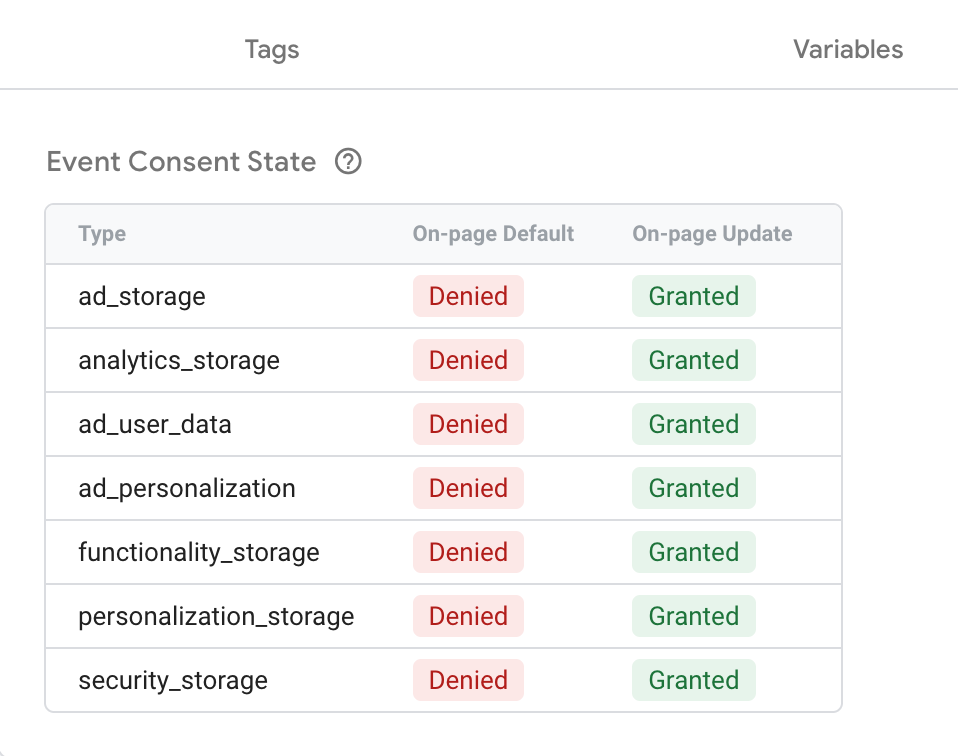 How to confirm UniConsent CMP for Google Consent Mode is working
2. 使用浏览器开发者控制台验证 Consent Mode 是否正常工作
在浏览器的开发者控制台中不应看到来自 UniConsent CMP 的任何警告消息。
3. 使用 UniConsent Consent Validator 验证 Consent Mode 是否正常工作
您可以安装 UniConsent Consent Validator 来验证 Consent Mode 数据是否在您的网页上正确传递。
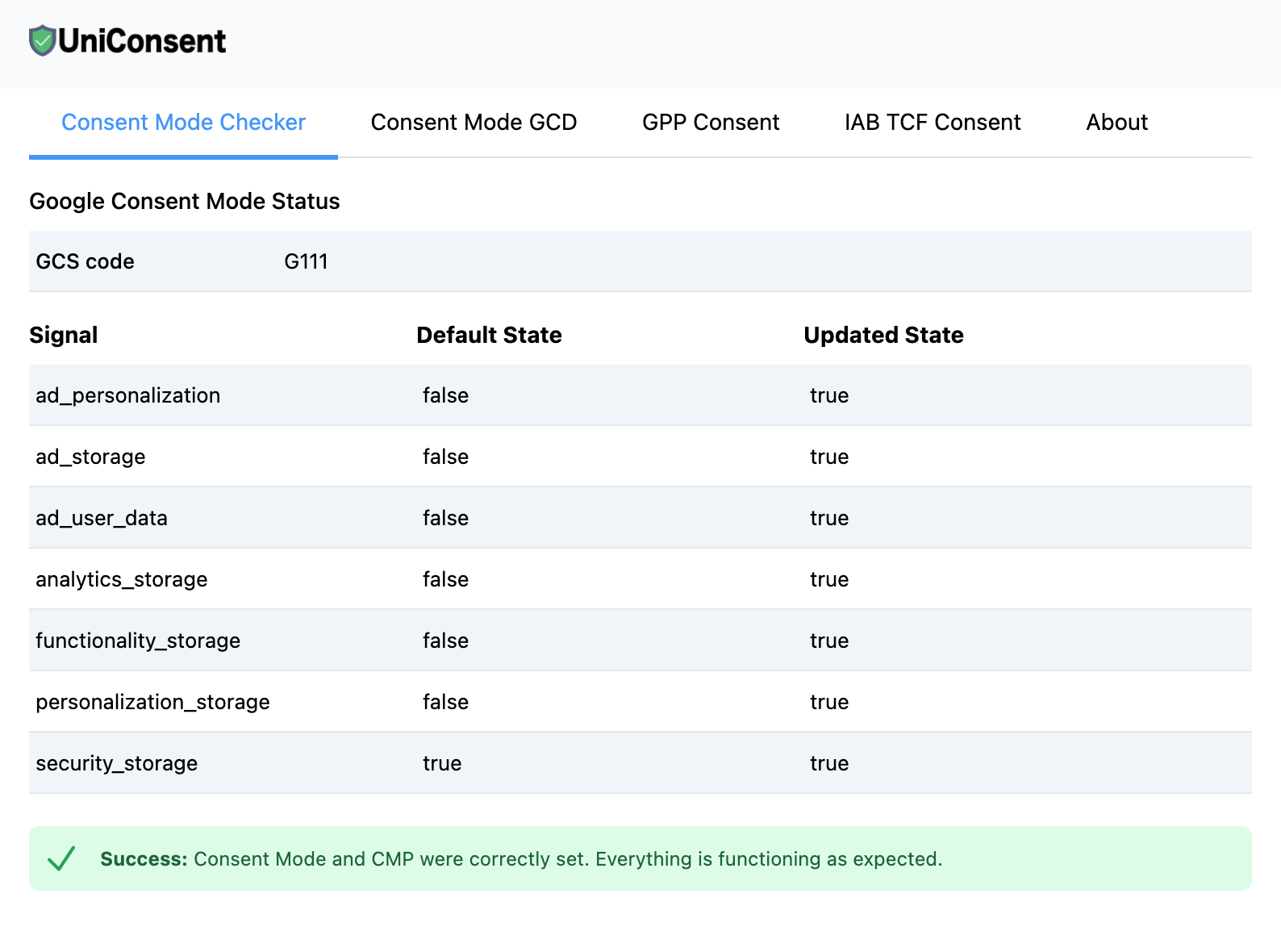 Verify Consent Mode is working with UniConsent Consent Validator
4. 使用 DataLayer API:
在浏览器控制台中输入 window.dataLayer = window.dataLayer || [];,您应该会找到一个 consent、update 部分。
{
    "0": "consent",
    "1": "update",
    "2": {
        "ad_storage": "granted",
        "ad_user_data": "granted",
        "analytics_storage": "granted",
        "functionality_storage": "granted",
        "personalization_storage": "granted",
        "ad_personalization": "granted",
        "security_storage": "granted"
    }
}
5. 通过 Javascript API 访问 Google Consent Mode 数据
您可以使用以下 Javascript API 来访问 Google Consent Mode 数据:
(function waitCMP() {
  var readyCMP
  if (!readyCMP && window['dataLayer']) {
    window['dataLayer'].forEach(function (event) {
      if (event['event'] === 'unic_data') {
        readyCMP = 1
        console.log(event['CONSENT_MODE'])
      }
    })
  }
  if (!readyCMP) {
    setTimeout(waitCMP, 100)
  }
})()
实施 Google Consent Mode、IAB TCF 或 GPP 时的常见错误:
-
已启用 Google Consent Mode,但缺少默认状态桩代码
问题: 您可能在 Validator 或开发者控制台中看到错误消息:
Error: Consent Mode Default Status is not added.
解决方案: 在页面顶部添加默认状态桩代码以解决此问题。您可以按照此处的说明操作:Consent Mode 默认状态标签安装。
-
已启用 Google Consent Mode,但默认状态桩代码添加在 Google 标签之后
问题: 如果默认状态桩代码添加在 Google 标签之后,您可能会在 Validator 或开发者控制台中看到以下错误消息:
Error: Your Google tags are loaded before Consent Mode Default Status and CMP.
解决方案: 确保默认状态桩代码添加在页面的最顶部,位于任何 Google 标签之前。请按照此处的指南操作:Consent Mode 默认状态标签安装。
-
通过 Google Tag Manager 启用了 Google Consent Mode,但并非所有 Google 标签都在 Google Tag Manager 中管理
问题: 当某些 Google 标签不在 Google Tag Manager 中管理时,您可能会看到与上述类似的错误。
解决方案: 在页面顶部添加默认状态桩代码,或确保所有 Google 标签都在 Google Tag Manager 中管理。请参阅指南:Consent Mode 默认状态标签安装。
-
缺少 IAB TCF 桩代码
问题: 未包含 IAB TCF 桩代码,导致潜在错误。
解决方案: 在页面顶部添加 IAB TCF 桩代码。请按照此处的说明操作:桩代码安装。
-
缺少 IAB GPP 桩代码
问题: 实施中缺少 IAB GPP 桩代码。
解决方案: 在页面顶部包含 IAB GPP 桩代码。您可以在此处找到相关指南:桩代码安装。
-
缺少 USP API 桩代码
问题: 未包含 IAB USP 桩代码。
解决方案: 要解决此问题,请在页面顶部添加 IAB USP 桩代码。详细说明请参阅:桩代码安装。
-
检测到同意设置延迟错误
问题: 即使您已添加默认同意状态代码,仍在开发者控制台或 Google Tag Diagnostics 中看到"consent set late"警告。
可能原因:
- 您的网站正在使用 Google Tag Gateway (GTG)。一键 CDN 注入(例如 Cloudflare)通过 CDN 将标签注入页面头部,使您失去对脚本加载顺序的控制。GTG 标签作为第一方脚本加载,因此基于查找 Google 域名脚本的 Basic Consent Mode 阻止方式变得无效。要验证,请参阅如何检查标签是否已注册 GTG。
- Google 标签在 Google Tag Manager 之外加载(例如硬编码在页面中),并且在页面源代码中出现在默认同意代码之前。
- 第三方插件或脚本在您的 CMP 和默认同意代码之前注入了 Google 标签。
解决方案: 如果 GTG 处于活跃状态,请参阅 Google Tag Gateway 教程 获取设置说明。如果不是 GTG 的问题,请确保默认同意代码和 UniConsent CMP 代码片段出现在页面源代码中所有 Google 标签之前。
排查 Google Tags 上缺失的 Consent Mode 或 TCF 信号
当您遇到 Google Tags 上缺失 Consent Mode 或 TCF(透明度与同意框架)信号的问题时,请首先联系 UniConsent 支持团队而非直接联系 Google 来开始故障排查。
如果您是 Google 客户,请通过电子邮件 support+google@uniconsent.com 联系我们,或在 UniConsent 支持社区论坛 发帖。UniConsent 支持团队将在 1 个工作日内提供技术回复。
如有紧急问题,请致电 +441134678278。
仍有疑问?
联系我们:support@uniconsent.com 或在控制台中使用在线聊天工具。