
Google Tag Manager Consent for Advertisers
Control when every advertising tag fires based on user consent. UniConsent integrates with GTM to ensure your ad pixels, analytics, and marketing tags only load when permitted.
Why GTM Needs Consent Management
Google Tag Manager makes it easy to deploy advertising tags — but without consent management, every tag fires immediately on page load, violating GDPR and ePrivacy requirements. You need a CMP that integrates with GTM to control tag firing based on user consent.
UniConsent works seamlessly with Google Tag Manager through built-in consent signals. Configure your GTM tags to respect consent categories — advertising, analytics, and functional — so each tag only fires when the user has granted the appropriate consent.
GTM + UniConsent Integration
Consent-Based Tag Triggers
UniConsent pushes consent state to GTM's dataLayer. Configure triggers so Google Ads, Meta Pixel, LinkedIn, TikTok, and all other tags fire only after consent is granted.
Google Consent Mode + GTM
Native Google Consent Mode v2 integration through GTM. Google tags automatically adjust behavior based on consent state — no manual trigger configuration needed for Google products.
Consent Categories
Map GTM tags to consent categories: strictly necessary, analytics, advertising, and functional. UniConsent blocks non-essential tags until users opt in to each category.
Server-Side GTM
UniConsent consent signals work with server-side Google Tag Manager. Ensure your server-side tags for Google Ads, Meta CAPI, and other platforms respect user consent choices.
Tag Auditing
Identify which GTM tags fire before consent and which respect consent signals. UniConsent's cookie scanner detects non-compliant tags so you can fix them in your GTM container.
No-Code Setup
Deploy UniConsent through GTM itself with a simple tag template. No developer required — install the CMP, configure consent categories, and your existing GTM tags automatically respect consent.
UniConsent CMP GTM Template
UniConsent provides an official tag template in the Google Tag Manager Community Template Gallery. Install it in your GTM container with one click — no custom code required.
- Available in the GTM Community Template Gallery
- Uses Consent Initialization trigger for correct loading order
- Built-in Google Consent Mode v2 signals for all Google tags
- Configure banner style and consent purposes from GTM UI
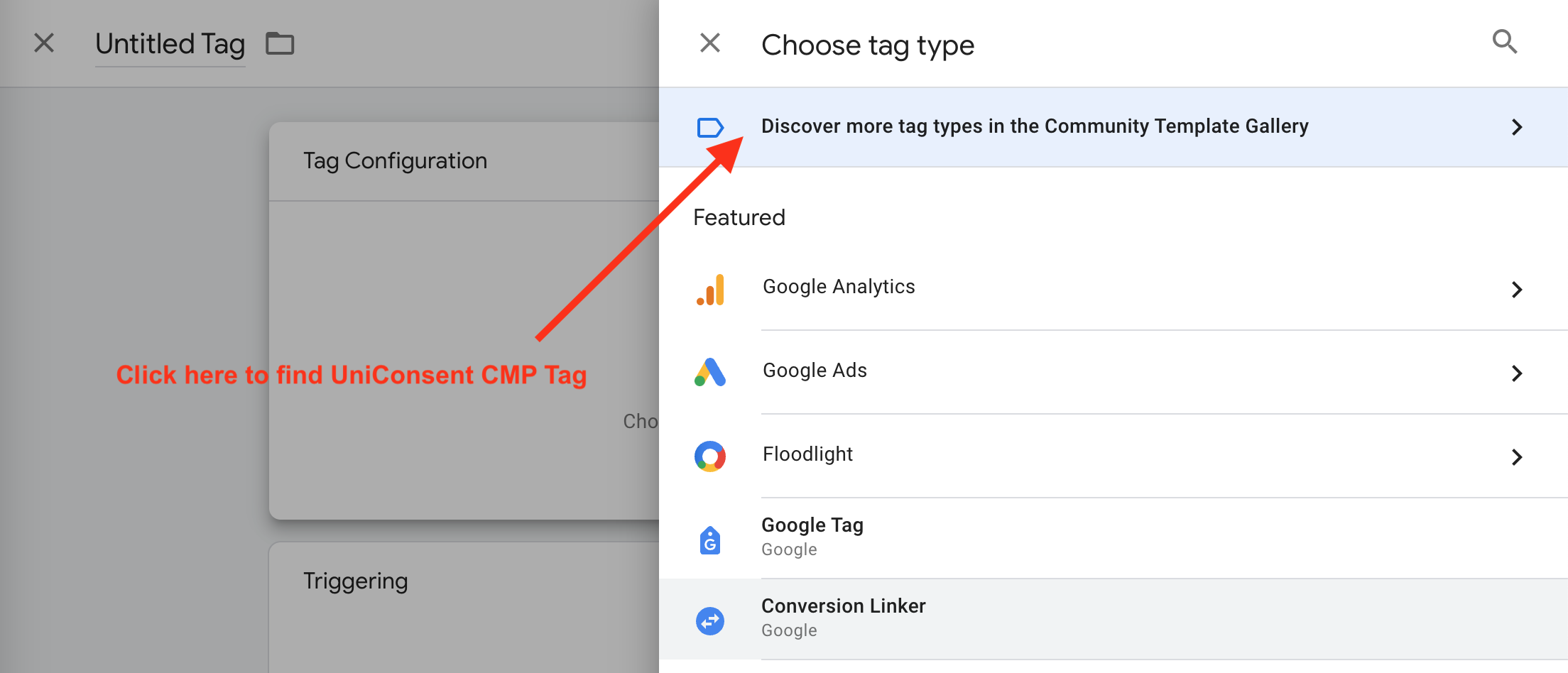
How to Install
Find Your License ID
Log in to your UniConsent account, go to Consent Manager > My Websites, and copy your site License ID.
Add the Template
In GTM, create a new tag, click Tag Configuration, then search for "UniConsent" in the Community Template Gallery and add it to your workspace.
Configure & Publish
Enter your License ID, select banner configuration, set the trigger to "Consent Initialization - All Pages", and publish your container. Your other GTM tags will now respect consent signals.
More Advertiser Resources
Consent for Advertisers
Complete consent management for advertisers and marketers.
Learn more →Google Consent Mode
Recover conversion data with Google Consent Mode v2 for Google Ads and GA4.
Learn more →Meta Ads Consent
Compliant consent for Facebook Pixel, Meta Conversions API, and Instagram ads.
Learn more →LinkedIn Ads Consent
Consent for LinkedIn Insight Tag, conversion tracking, and Matched Audiences.
Learn more →Microsoft Ads Consent
Consent for Microsoft UET tag, Bing Ads, and Microsoft Audience Network.
Learn more →Retargeting Consent
Consent management for retargeting pixels and conversion tracking across ad platforms.
Learn more →Get started to make your website and application compliant for EU GDPR, US CPRA, CA PIPEDA etc
Sign up