
Google Tag Manager-Einwilligung für Werbetreibende
Steuern Sie, wann jedes Werbe-Tag basierend auf der Nutzerzustimmung ausgelöst wird. UniConsent integriert sich in GTM, damit Ihre Werbe-Pixel, Analyse- und Marketing-Tags nur laden, wenn dies erlaubt ist.
Warum GTM Consent-Management benötigt
Google Tag Manager macht die Bereitstellung von Werbe-Tags einfach – aber ohne Consent-Management wird jedes Tag sofort beim Laden der Seite ausgelöst und verstößt damit gegen DSGVO- und ePrivacy-Vorgaben. Sie benötigen eine CMP, die sich in GTM integriert, um die Tag-Auslösung auf Basis der Nutzerzustimmung zu steuern.
UniConsent arbeitet dank integrierter Consent-Signale nahtlos mit Google Tag Manager zusammen. Konfigurieren Sie Ihre GTM-Tags so, dass sie die Consent-Kategorien – Werbung, Analyse und Funktional – berücksichtigen, sodass jedes Tag erst ausgelöst wird, wenn der Nutzer die entsprechende Zustimmung erteilt hat.
GTM + UniConsent-Integration
Einwilligungsbasierte Tag-Trigger
UniConsent übergibt den Consent-Status an den dataLayer von GTM. Konfigurieren Sie Trigger so, dass Google Ads, Meta Pixel, LinkedIn, TikTok und alle anderen Tags erst nach Erteilung der Zustimmung ausgelöst werden.
Google Consent Mode + GTM
Native Google Consent Mode v2-Integration über GTM. Google-Tags passen ihr Verhalten automatisch an den Consent-Status an – für Google-Produkte ist keine manuelle Trigger-Konfiguration erforderlich.
Einwilligungskategorien
Ordnen Sie GTM-Tags den Consent-Kategorien zu: unbedingt erforderlich, Analyse, Werbung und Funktional. UniConsent blockiert nicht essenzielle Tags, bis Nutzer der jeweiligen Kategorie zustimmen.
Serverseitiges GTM
Die Consent-Signale von UniConsent funktionieren mit serverseitigem Google Tag Manager. Stellen Sie sicher, dass Ihre serverseitigen Tags für Google Ads, Meta CAPI und andere Plattformen die Zustimmungsentscheidungen der Nutzer berücksichtigen.
Tag-Prüfung
Ermitteln Sie, welche GTM-Tags vor der Zustimmung ausgelöst werden und welche die Consent-Signale berücksichtigen. Der Cookie-Scanner von UniConsent erkennt nicht konforme Tags, damit Sie diese in Ihrem GTM-Container korrigieren können.
Einrichtung ohne Code
Stellen Sie UniConsent direkt über GTM mit einer einfachen Tag-Vorlage bereit. Kein Entwickler erforderlich – installieren Sie die CMP, konfigurieren Sie die Consent-Kategorien, und Ihre bestehenden GTM-Tags berücksichtigen die Zustimmung automatisch.
UniConsent CMP GTM-Vorlage
UniConsent stellt eine offizielle Tag-Vorlage in der Google Tag Manager Community Template Gallery bereit. Installieren Sie sie mit einem Klick in Ihrem GTM-Container – ohne eigenen Code.
- Verfügbar in der GTM Community Template Gallery
- Verwendet den Consent-Initialization-Trigger für die korrekte Ladereihenfolge
- Integrierte Google Consent Mode v2-Signale für alle Google-Tags
- Konfigurieren Sie Banner-Stil und Einwilligungszwecke über die GTM-Oberfläche
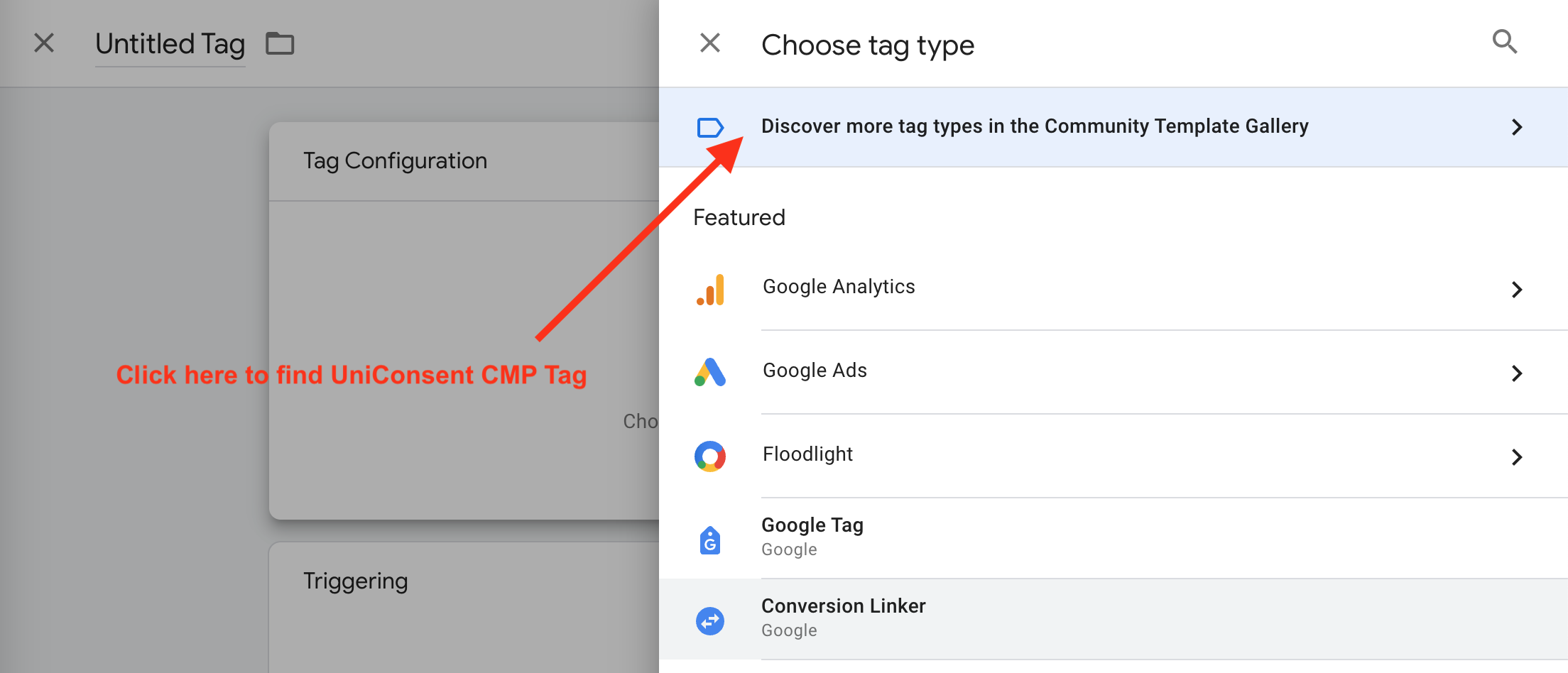
So installieren Sie es
Finden Sie Ihre Lizenz-ID
Melden Sie sich bei Ihrem UniConsent-Konto an, navigieren Sie zu Consent Manager > Meine Websites und kopieren Sie die License ID Ihrer Website.
Vorlage hinzufügen
Erstellen Sie in GTM ein neues Tag, klicken Sie auf Tag-Konfiguration, suchen Sie dann in der Community Template Gallery nach "UniConsent" und fügen Sie es Ihrem Workspace hinzu.
Konfigurieren und veröffentlichen
Geben Sie Ihre License ID ein, wählen Sie die Banner-Konfiguration aus, setzen Sie den Trigger auf "Consent Initialization - All Pages" und veröffentlichen Sie Ihren Container. Ihre übrigen GTM-Tags berücksichtigen nun die Consent-Signale.
Weitere Ressourcen für Werbetreibende
Einwilligung für Werbetreibende
Umfassendes Consent-Management für Werbetreibende und Marketer.
Mehr erfahren →Google Consent Mode
Stellen Sie Conversion-Daten mit Google Consent Mode v2 für Google Ads und GA4 wieder her.
Mehr erfahren →Meta Ads-Einwilligung
Konforme Einwilligung für Facebook Pixel, Meta Conversions API und Instagram-Anzeigen.
Mehr erfahren →LinkedIn Ads-Einwilligung
Einwilligung für LinkedIn Insight Tag, Conversion-Tracking und Matched Audiences.
Mehr erfahren →Microsoft Ads-Einwilligung
Einwilligung für Microsoft UET-Tag, Bing Ads und Microsoft Audience Network.
Mehr erfahren →Retargeting-Einwilligung
Consent-Management für Retargeting-Pixel und Conversion-Tracking über alle Werbeplattformen hinweg.
Mehr erfahren →Beginnen Sie damit, Ihre Website und Anwendung gemäß EU-DSGVO, US-CPRA, CA-PIPEDA usw. konform zu machen
Registrieren