







包含内容
适用于 GDPR / CCPA 的 WordPress Cookie 同意插件
Wordpress Cookie consent plugin displays a cookie consent banner to users then passes consent signals to advertising and analytics vendors, unifying the compliance process.
Control and update the CMP styles, setup without changing the scripts on your Wordpress site. UniConsent CMP is a IAB EU certified Consent Manager.
UniConsent 的 WordPress Cookie 同意插件介绍
Ensuring your WordPress website adheres to the stringent data protection regulations like GDPR and CCPA is now streamlined with UniConsent's Cookie Consent CMP (Consent Management Platform). This sophisticated plugin serves as your dedicated solution for managing cookie consent seamlessly, enhancing user privacy, and unifying the compliance process.
功能
- 1用户友好的 Cookie 同意横幅
- UniConsent 的插件向访客展示清晰且用户友好的 Cookie 同意横幅。该横幅是合规流程的第一步,为用户提供对其数据的透明度和控制权。
- 2无缝传输同意信号
- UniConsent 的 CMP 不仅展示横幅,还更进一步,将同意信号高效传输给广告和分析供应商。这确保您的网站在保持合规的同时,与对网站功能至关重要的第三方服务无缝集成。
- 3可自定义的 CMP 样式
- 掌控您的 Cookie 同意管理平台的视觉外观。UniConsent 的插件允许您自定义同意横幅的样式,而无需深入研究 WordPress 网站上繁琐的脚本更改。这在保持合规的同时确保一致且美观的用户体验。
- 4在 WordPress 上轻松设置
- UniConsent 的 WordPress CMP 以简洁为设计理念。您无需修改 WordPress 网站上的脚本即可设置和配置该插件。这种用户友好的方式让集成过程顺畅无忧。
- 5IAB EU 认证的同意管理器
- UniConsent 的 CMP 不是普通的插件;它获得了欧盟互动广告局 (IAB) 的同意管理器认证。这一认证增加了一层可信度,让用户和网站所有者都能放心,UniConsent 遵循行业标准和最佳实践。
如何设置
1. 登录 WordPress 并安装 UniConsent 插件
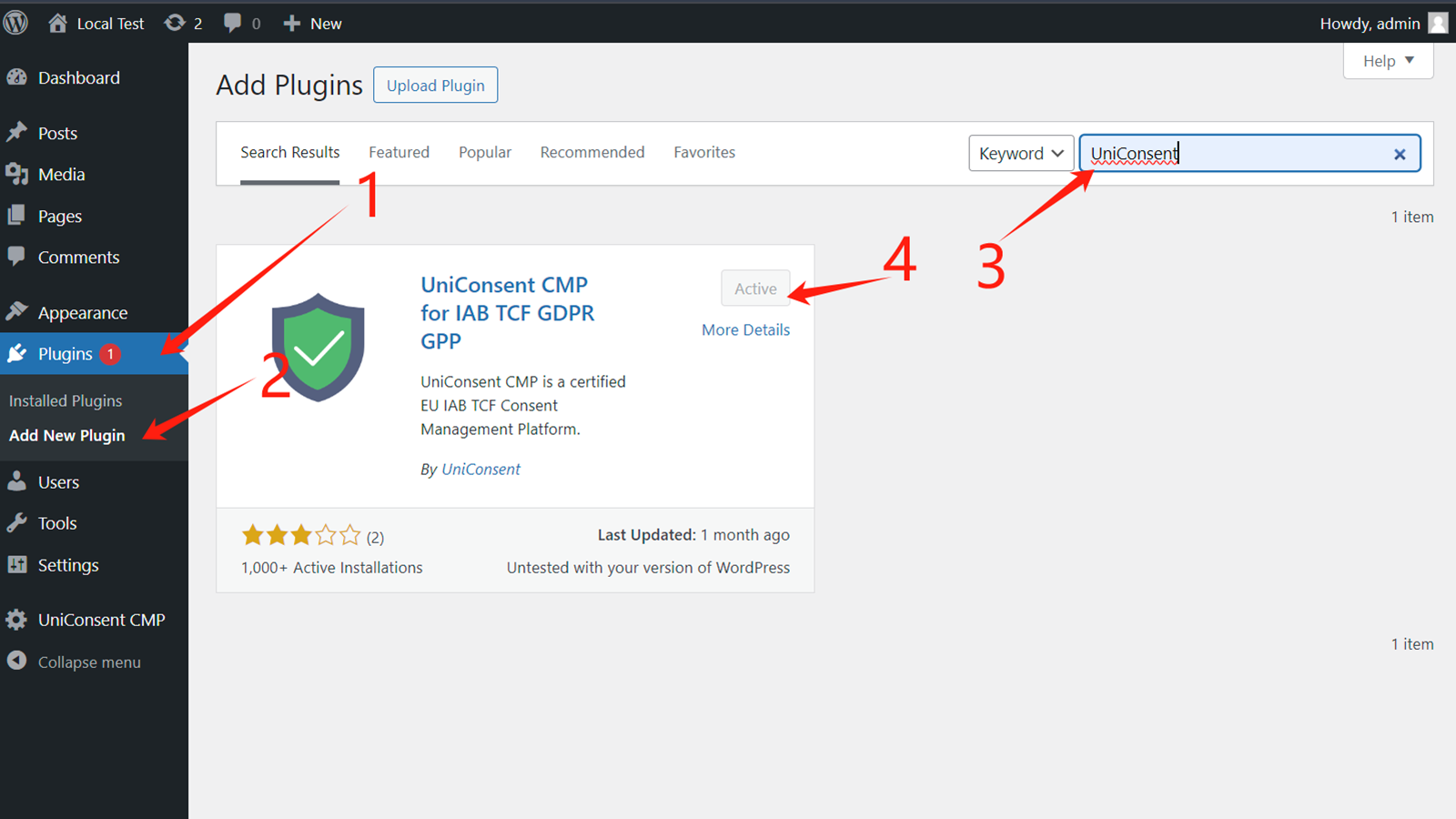
First, log in to your WordPress account and navigate to the WPAdmin page.
Second, click on Plugins section > Add New Plugin.
Then, on the add plugin page, search for "UniConsent" - Download Link on wordpress.org.
After the page shows you the UniConsent plugin, click on the "Install Now" button.
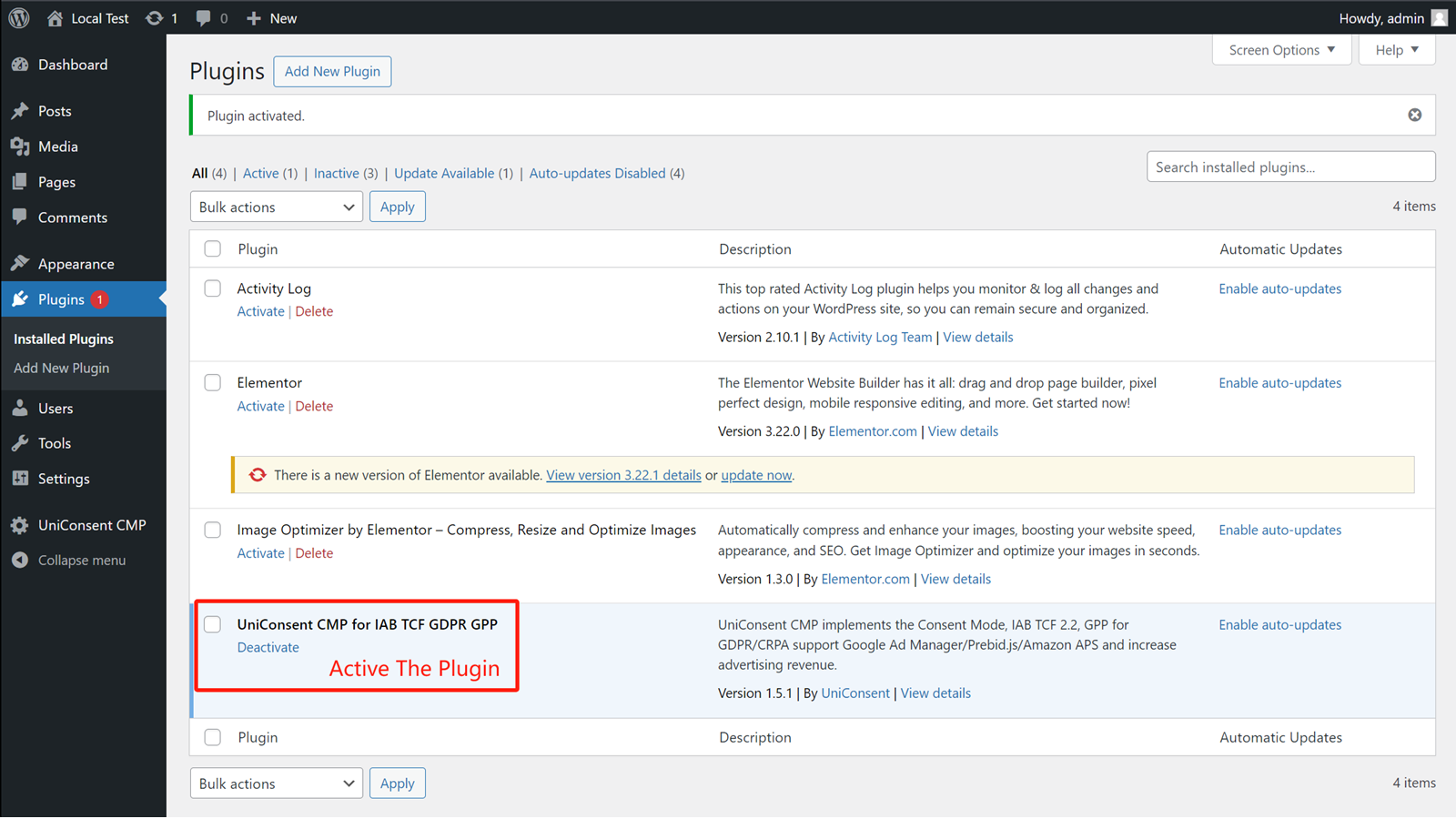
On the plugins section, ensure the UniConsent plugin is installed and activated. Then, you will find UniConsent Settings in your navigation.
2. 获取 UniConsent CMP 安装代码
Third, log in to your UniConsent account, go to Consent Manager > My Websites, and click Manage. (Optional)
Then, click Install & Setup and copy the license code at the bottom of the page.

Then, configure your custom settings in WordPress (only need to input the license if you have one, then configure your preference in UniConsent).
优势
UniConsent 对合规的承诺确保您的 WordPress 网站在不影响用户体验的情况下遵守 GDPR 和 CCPA 法规。数据保护与无缝功能之间的平衡得以保持。
用户友好的同意横幅提供透明度,让用户能够就其数据做出知情选择。UniConsent 优先采用以用户为中心的方式,深知尊重用户隐私的重要性。
自定义 CMP 横幅样式的能力确保您的 WordPress 网站保持品牌一致性。UniConsent 让网站所有者能够在遵守法律要求的同时定制视觉元素。
UniConsent 获得 IAB EU 认证的同意管理器资格,彰显了其对行业标准的坚持。这一认证确保您的 WordPress 网站由符合监管期望的可靠解决方案提供支持。
UniConsent 的 WordPress Cookie 同意 CMP 是 GDPR 和 CCPA 合规的强大解决方案。通过 UniConsent 用户友好且经认证的插件,提升网站的隐私标准,增强用户信任,并无缝集成合规的同意管理流程。