
Shopify Cookie 同意横幅
UniConsent 是您值得信赖的合规合作伙伴,我们深知将解决方案与 Shopify 无缝集成的重要性。







包含内容
用于 GDPR 和 CCPA 合规的 Shopify Cookie 同意应用
Shopify GDPR CCPA CMP plugin is a cookie consent management solution by Uniconsent.
UniConsent 的 Shopify Cookie 同意应用介绍
Ensuring compliance with data protection regulations like GDPR and CCPA is no longer a hassle for Shopify store owners, thanks to UniConsent's Cookie Consent CMP (Consent Management Platform). This cutting-edge app serves as the ultimate solution for effortlessly managing cookie consent, prioritizing user privacy, and seamlessly aligning with compliance standards.
功能
- 1美观且用户友好的同意横幅
- UniConsent 的 Shopify CMP 应用带来美观且用户友好的 Cookie 同意横幅。这一初始交互为访客提供了对其数据的透明度和控制权,为尊重隐私的用户体验定下基调。
- 2高效传输同意信号
- UniConsent 的 CMP 应用不仅仅是展示横幅,还擅长将同意信号传输给广告和分析供应商。这确保您的 Shopify 商店在保持合规的同时,继续与对商店功能至关重要的第三方服务无缝集成。
- 3定制 CMP 样式以保持品牌一致性
- 掌控您的 Cookie 同意管理平台的视觉呈现。UniConsent 的应用允许您自定义同意横幅的样式,而无需进行复杂的脚本修改。这种自定义确保在遵守法律要求的同时提供视觉上一致且美观的用户体验。
- 4与 Shopify 轻松集成
- UniConsent 的 Shopify CMP 以简洁为设计理念。您可以轻松设置和配置该应用,而无需对 Shopify 商店进行繁琐的脚本更改。这种用户友好的方式简化了集成流程,节省时间和资源。
- 5IAB EU 认证,合规值得信赖
- UniConsent 的 CMP 应用不只是又一款插件;它获得了欧盟互动广告局 (IAB) 的认证,是值得信赖的同意管理器。这一认证增加了额外的可信度,让用户和商店所有者都能放心,UniConsent 遵循行业标准和最佳实践。
使用 Shopify 应用进行设置
You can find UniConsent Cookie Compliance App in Shopify App Marketplace and get started at UniConsent Cookie Compliance App.
手动设置
First, login to your UniConsent account, go to Consent Manager - My Websites, click Manage.
Second, click Install & Setup and copy the cmp code in the black area.

Third, Login to your Shopify account and go Online Store - Themes and click the Customize button.
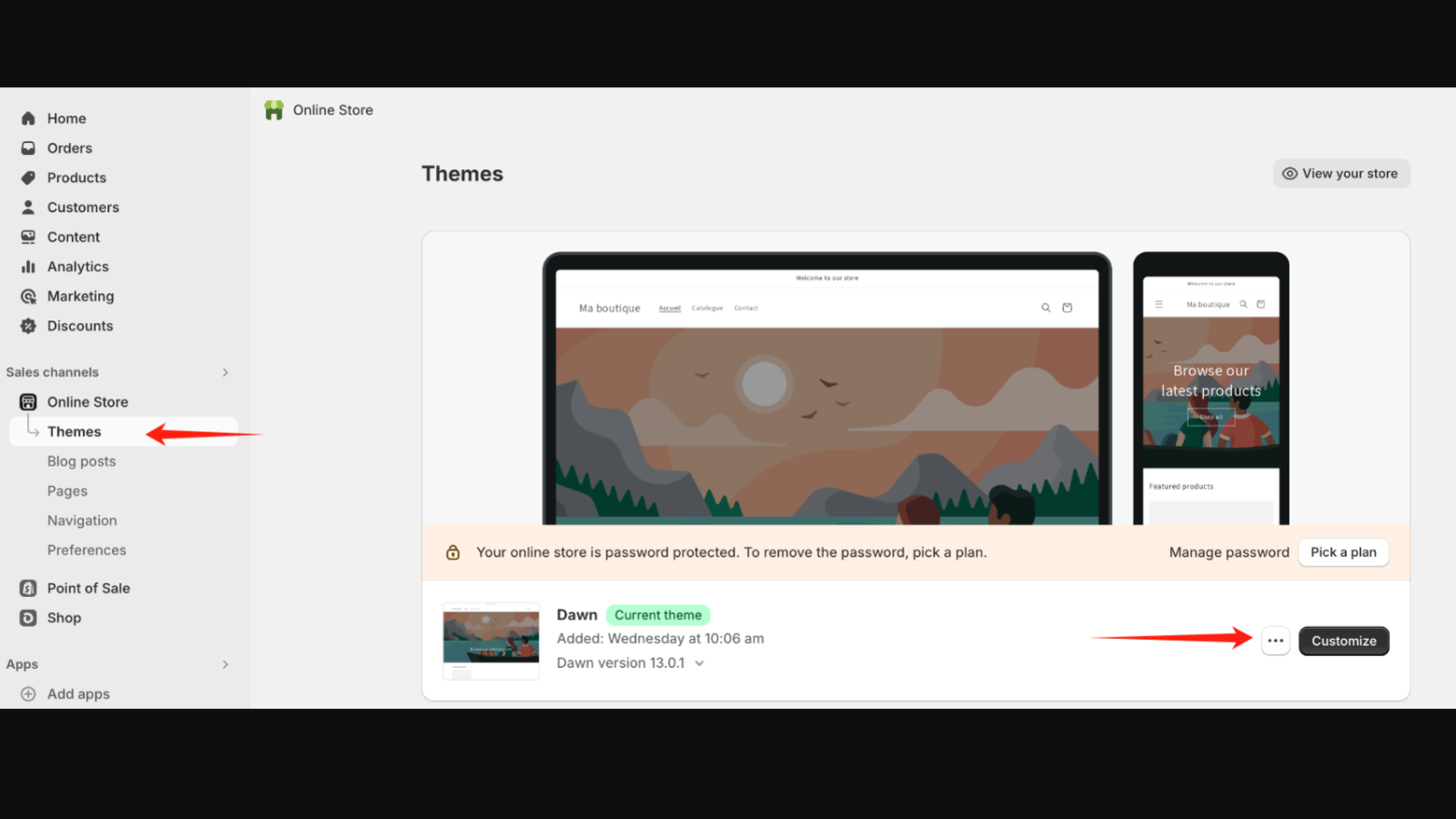
Then, enable Shopify's Customer Privacy API and edit the code of the current theme by clicking the ... button and selecting ... - Edit Code.
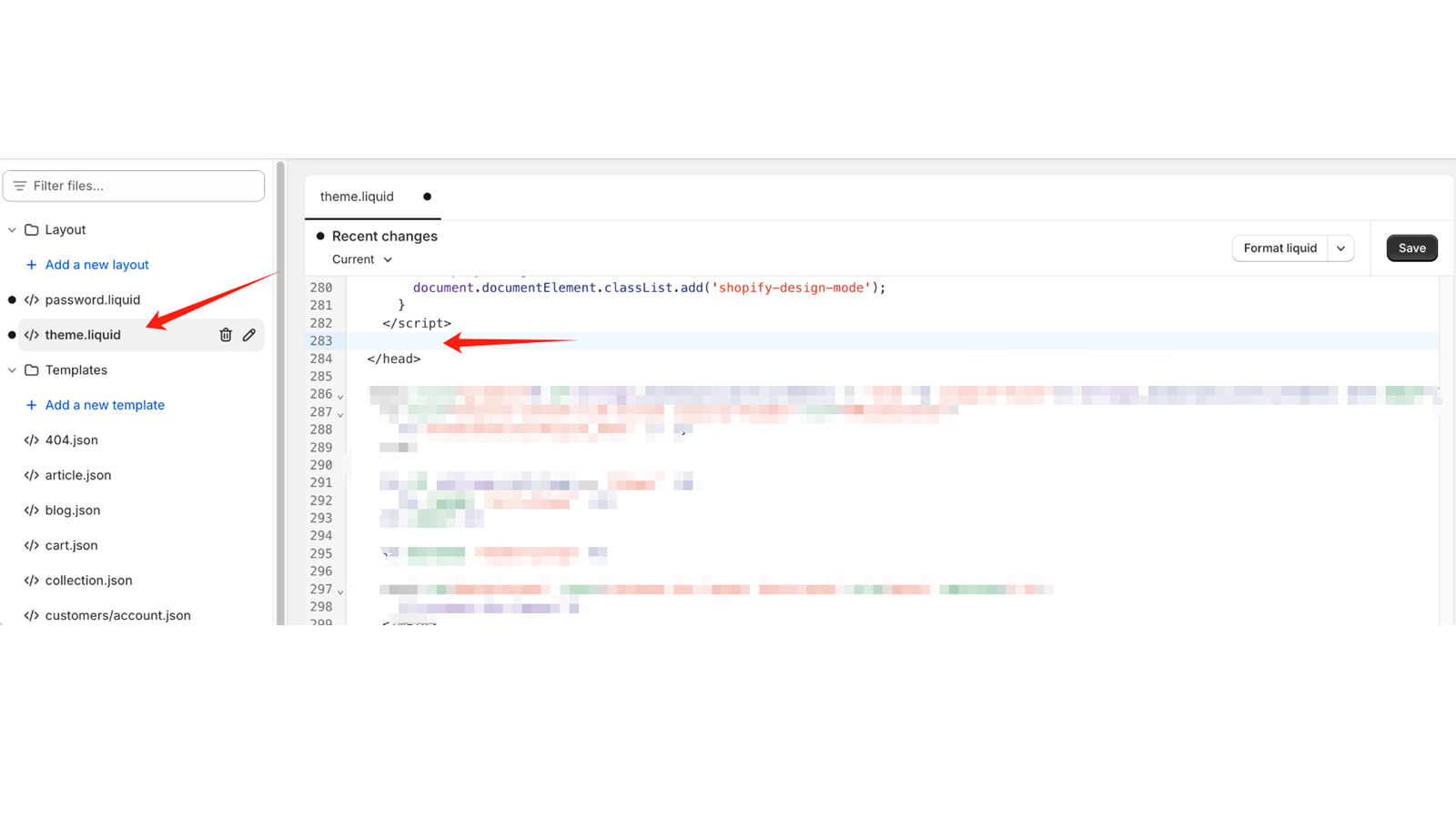
Afterwards, open the file theme.liquid and insert the CMP code you copied from UniConsent under head tag
Go back to the store homepage after press Save
After that, in Settings - Customer privacy - Cookie Banner page, click on More actions - Use custom cookie banner.
While enabling the custom cookie banner, make sure that all regions are selected and then click on Confirm.
优势
UniConsent 对合规的承诺确保您的 Shopify 商店在不影响用户体验的情况下符合 GDPR 和 CCPA 法规。该应用在强有力的数据保护与无缝功能之间取得了平衡。
用户友好的同意横幅促进透明度,让用户能够就其数据做出知情选择。UniConsent 高度重视以用户为中心的方式,深知尊重用户隐私的重要性。
UniConsent 的应用提供自定义 CMP 横幅样式的灵活性,使您的 Shopify 商店能够保持品牌一致性。这种自定义让商店所有者能够在遵守法律要求的同时,使视觉元素与其品牌保持一致。
IAB EU 认证彰显了 UniConsent 对行业标准的坚持。凭借这一认证,Shopify 商店所有者可以放心,UniConsent 的 CMP 应用是符合监管期望的可靠解决方案。
UniConsent 的 Shopify Cookie 同意 CMP 为 GDPR 和 CCPA 合规提供强大的解决方案。通过 UniConsent 经认证且用户友好的应用,提升商店的隐私标准,培养用户信任,并无缝集成合规的同意管理流程。让 UniConsent 彻底革新您 Shopify 商店的数据保护方式。